Designing AI Handoffs: Enhance Customer Experience
AI System Design, Customer Handoff, Escalation Triggers, Customer Experience, Support Execution, After-hours Handling
Designing AI Handoffs: The Missing Link in Serious AI System Design
When AI takes the front line with your customers, the real test is not just what it can handle autonomously, but what happens the moment it cannot. Thoughtful Customer Handoff design is the difference between a seamless experience and a trust-destroying dead end.
Why Handoff Design Is Core to Serious AI System Design
Many businesses invest heavily in AI System Design for intake, qualification, and routine support flows, but neglect the most fragile moment in the entire journey: the handoff from AI to a human. At Bot-Brand, we see this pattern repeatedly in high-volume local service businesses and enterprise environments. The AI agent is polished, the flows are optimized, but the escalation path is improvised or nonexistent.
That gap directly undermines Customer Experience. When an AI system fails gracefully and hands a conversation to a human with precision, customers feel taken care of. When it stalls, loops, or hides behind vague responses, customers feel ignored, dismissed, or deceived. For brands pursuing absolute digital autonomy, the goal is not to remove humans entirely, but to architect a controlled, intelligent interface between autonomous systems and human operators.
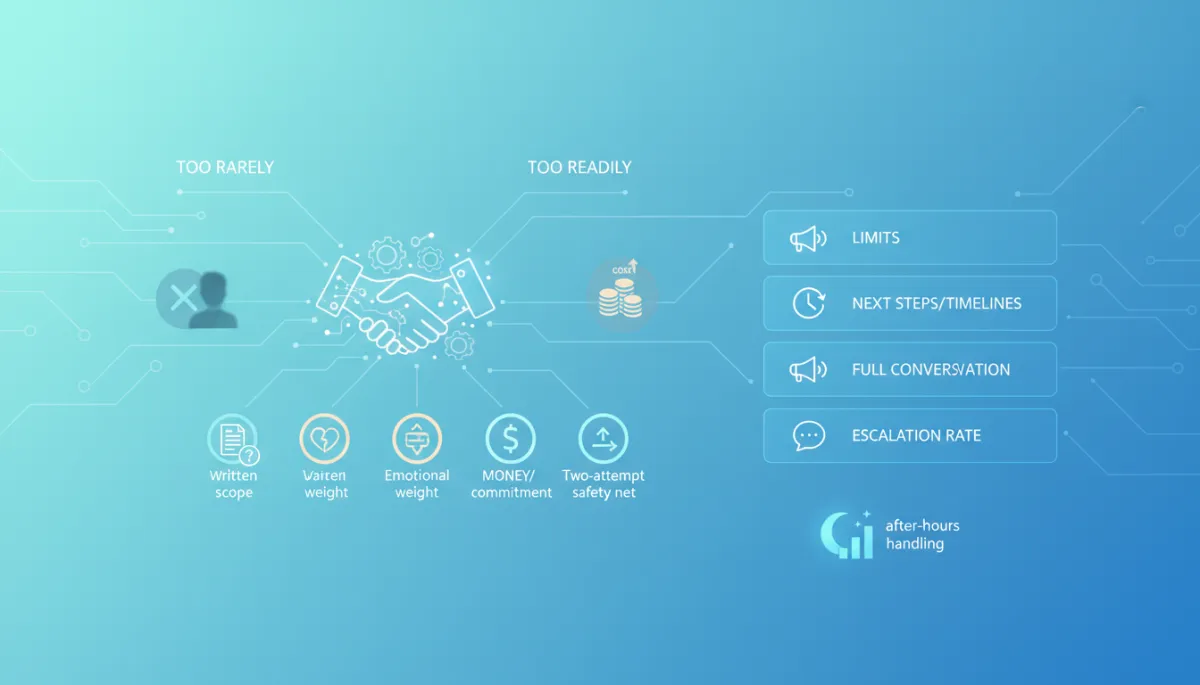
The Two Failure Modes: Too Little vs. Too Much Escalation
Poorly designed Customer Handoff usually shows up in one of two failure modes, both of which erode trust and profitability in different ways.
1. Escalating Too Rarely: Customers Feel Ignored or Trapped
In this mode, the AI clings to control. It keeps trying to answer, rephrasing the same unhelpful response, or hiding its limitations behind generic language. Customers experience this as being trapped in a loop with “no way out.” The result: frustration, negative reviews, and lost deals that never make it to a human closer. For high-velocity sales funnels, this directly undercuts revenue and damages brand credibility around the clock.
2. Escalating Too Readily: Costly Overload of Human Teams
On the other side, some businesses panic and route almost everything to humans. The AI acts more like a glorified contact form than an autonomous system. This defeats the purpose of AI System Design: your team is flooded with low-value inquiries, after-hours Handling becomes chaotic, and operational costs spike. The system looks advanced on the surface but delivers none of the promised leverage of 24/7 autonomous infrastructure.

Balanced escalation avoids both customer frustration and unnecessary human workload.
Four Escalation Triggers That Cover Almost Every Scenario
Bot-Brand’s Neural Intercept Protocol is built around four simple, robust Escalation Triggers that capture nearly every situation where a handoff protects both the customer and the business. These rules are easy to implement but powerful in practice.
1. Anything Outside a Written Scope
If the request falls outside clearly documented, approved behavior, the AI should not improvise. This includes legal advice, medical guidance, policy exceptions, or anything not explicitly covered in your knowledge base or playbooks. The AI can acknowledge the question, but the response should pivot toward escalation rather than speculation. This protects your brand’s technical architectural integrity and reduces compliance risk.
2. Anything Carrying Emotional Weight
AI can simulate empathy, but in emotionally charged situations, a machine apology can feel dismissive or even offensive. Complaints, distress, safety concerns, and sensitive personal issues should trigger a human review. The AI’s role is to acknowledge the concern, capture context with precision, and route it to an appropriate team member. This is non-negotiable if you care about long-term Customer Experience and brand trust.
3. Anything Involving Money or Commitment
Pricing exceptions, refunds, contract changes, long-term commitments, or high-ticket proposals should never be handled autonomously beyond predefined rules. The AI can qualify, summarize, and propose next steps, but a human should confirm or authorize decisions that have financial or legal consequences. This keeps your high-velocity operational scaling aligned with healthy risk management.
4. A Two-Attempt Safety Net
Even within scope, your AI will occasionally misinterpret the request. A simple rule: if the AI fails to resolve the issue after two clear attempts (or the user directly expresses confusion or dissatisfaction), it should trigger escalation. This prevents endless loops and demonstrates that your system prioritizes resolution over ego. The AI must be designed to “know when to stop” and invite a human into the loop.
💡 Pro Tip: Encode your Escalation Triggers as explicit logic, not vague “fallbacks.” This keeps your Customer Handoff predictable, auditable, and aligned with business policy.
Best Practices for Support Execution During Handoff
Escalation Triggers define when to hand off. Support Execution defines how to do it in a way that feels premium, not patched. Bot-Brand emphasizes three execution pillars in every AI System Design engagement.
1. State Limits Clearly and Professionally
Customers respond well to clarity. Instead of vague phrases like “I’m not sure,” your AI should use direct, honest language: “I’m an automated assistant and I’m not authorized to make billing changes, but I will route this to our team.” This reinforces that the system is intentionally constrained by design, not broken or confused, and aligns with your brand’s commitment to precision logic.
2. Provide Specific Next Steps and Timelines
A good Customer Handoff always answers the question, “What happens now?” Your AI should specify who will respond, through which channel, and by when. For example: “I’ve sent this to our billing specialist. You’ll receive an email update within one business day.” Specificity converts uncertainty into confidence and makes your AI feel like a disciplined part of a larger operational ecosystem.
3. Carry the Full Conversation Forward
Nothing destroys perceived intelligence faster than forcing customers to repeat themselves. Your AI should hand off a complete conversational summary to the human agent: user intent, relevant details, prior answers, and any captured files or links. On the human side, the agent should open with context, not “How can I help you today?”

Structured AI summaries let humans act instantly without re-asking basic questions.
Honest and Effective After-hours Handling
For high-volume local services and enterprises, true 24/7 coverage is a major promise of autonomous AI infrastructure. But even with AI in place, your human teams are not always available. After-hours Handling must be honest and operationally realistic, not aspirational fiction.
Instead of pretending a human is “on it right now,” your AI should transparently communicate availability and response windows: “Our human team is offline until 7:00 AM local time. I’ve logged your request with high priority, and you can expect a response by 10:00 AM.” When urgent issues arise outside your escalation scope—such as safety concerns—your AI should provide appropriate emergency instructions rather than implying immediate human intervention it cannot deliver.
📌 Key Takeaway: Honest timing beats artificial urgency. Customers will accept delays if your AI sets clear expectations and follows through reliably.

Well-designed after-hours flows protect trust even when humans are offline.
Escalation Rate: The Hidden Metric That Reveals System Health
In mature AI System Design, the escalation rate is a core performance metric, not an afterthought. It measures the percentage of interactions that move from AI to human. For Bot-Brand clients, this number is tracked alongside conversion rate, resolution time, and customer satisfaction.
A consistently high escalation rate suggests your AI is underpowered, your scope is too narrow, or your triggers are overly conservative. You are paying for autonomy but getting a human-heavy operation. A suspiciously low escalation rate is just as concerning: it may indicate that your AI is overconfident, mishandling edge cases, or suppressing customer signals that should reach a human. In both cases, you are burning either money or trust—sometimes both.

Escalation rate trends expose whether your AI is underused or overextended.
The goal is not a specific “magic” percentage, but a stable, explainable pattern aligned with your Escalation Triggers and business model. When escalation rate shifts, you should be able to point to a clear cause: new scope, updated policies, seasonal demand, or improved AI training. If you cannot, your Customer Handoff architecture needs a diagnostic review.
Turning Handoff Into a Strategic Advantage with Bot-Brand
For businesses serious about replacing manual bottlenecks with autonomous AI infrastructure, Customer Handoff is not a minor detail—it is a strategic layer. When Escalation Triggers are precise, Support Execution is disciplined, and After-hours Handling is honest, your AI becomes a trusted operational gateway rather than a fragile experiment at the edge of your brand.
Bot-Brand’s Neural Intercept Protocol is engineered to handle the entire top-of-funnel with human-grade inflection while preserving a clean, auditable bridge to your internal teams. We design AI System Design architectures where escalation is intentional, measured, and aligned with your revenue model—so every handoff either protects risk, unlocks a sale, or rescues a relationship.
If you are running high-volume local services or enterprise operations and want your AI to do more than just answer FAQs, it is time to treat handoff as a first-class design problem. Audit your Escalation Triggers, map your after-hours Handling, and put escalation rate on the same dashboard as your core KPIs.
To architect a Customer Handoff framework that matches your growth targets and risk profile, initialize a Secure Uplink for an Architectural Audit and Systems Diagnostic with Bot-Brand. Your next competitive advantage may be hiding in the way your AI knows when—and how—to ask for help.